


HOT PRODUCT | LOW STOCK
Smart Projector with 1080p Auto Focusing Multi Functional Short Throw Projection Capabilities
Smart Projector with 1080p Auto Focusing Multi Functional Short Throw Projection Capabilities
Easy to set up & play anywhere
Couldn't load pickup availability
-
Ordered
- - -
Order Ready
- - -
Delivered

Smart Projector with 1080p Auto Focusing Multi Functional Short Throw Projection Capabilities


Don’t just hear it from us !
-

ryan M (US)
Honestly I’m impressed with how compact this projector is. The picture is clear and it’s perfect for turning a bedroom wall into a big screen It’s also lightweight enough to take with me when I travel

-

Emma J (CAN)
I absolutely love this little projector! Setup was quick and easy, and watching movies and reading stories on a huge screen feels so much better than using my phone. Great product for cozy nights at home

-

Daniel K (UK)
Such a useful and portable projector. The image quality is excellent and I love that I can use it in different rooms without taking up much space. Definitely worth it for anyone who wants a big-screen experience without a big TV


Turn Every Page Into a Big-Screen Experience
Turn any blank wall into an immersive reading experience with the Page Project Book Projector ™
Enjoy larger,
easier-to-read pages from your favorite eBooks, PDFs, and reading apps while relaxing in bed, on the couch, or even in the bath. Its compact design, clear projection, and simple setup make it perfect for cozy nights at home or travel. You can also use it to watch movies, display photos, or deliver presentations. Read bigger, relax longer, and experience every story in an entirely new way.

Full HD Projector for Immersive Home Entertainment
This projector delivers a Full HD 1920 × 1080 resolution at 30Hz, providing sharp, vibrant, and clear images for an immersive viewing experience. Its compact and modern design with an adjustable stand makes it easy to position at different viewing angles, while the powerful optical lens produces detailed visuals with excellent clarity. Ideal for movies, TV shows, gaming, presentations, and home entertainment, it combines high-quality projection with a stylish design that fits perfectly into modern spaces
give a heading for this

Multi-Device Compatibility & Versatile Connectivity
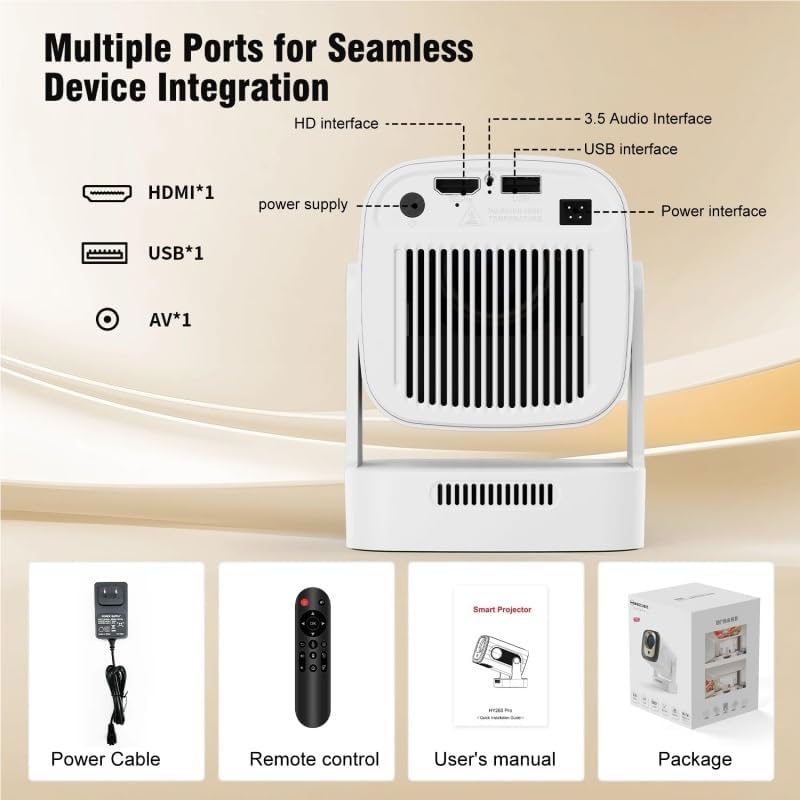
This projector offers multi-device compatibility with a wide range of entertainment and connectivity options, supporting AV, HDMI, and USB inputs. It can connect with devices such as iPhone, iPad, laptops, PC TV sticks, DVD players, USB drives, headphones, Bluetooth speakers, gaming consoles like Switch, and Miracast-enabled devices. With its large-screen projection capability, built-in connectivity options, and versatile device support, it is suitable for movies, streaming, gaming, presentations, and home entertainment.
Frequently Asked Questions
How does the Page Project Book Projector™ work?
How does the Page Project Book Projector™ work?
Connect your phone, tablet, laptop, or compatible streaming device to the projector, then open your preferred reading app or digital book. The projector displays the content on a wall or screen, allowing you to enjoy larger, easier-to-read pages.
Which reading apps can I use?
Which reading apps can I use?
You can display content from popular platforms such as Kindle, Apple Books, Google Play Books, Kobo, Draft2Digital, PDFs, and other eBook sources when accessed through a connected compatible device.
Is a projector screen required?
Is a projector screen required?
No. A smooth, light-colored wall works well, although a projector screen can provide a brighter and more uniform image.
Can it display regular PDFs and eBooks?
Can it display regular PDFs and eBooks?
Yes. Open the PDF or eBook on your connected device and mirror or transmit the screen to the projector. File compatibility depends on the device and app you use.